
At the time of planning the only priority i had in mind was being able to write blogs and journals and publish them directly from my phone (cause I’m soo used to typing from my phone, and I always have it with me). So even if it meant making my own tools and building my own workflow, I was willing to do it. I had a few complicated ideas that would’ve been really fun and time consuming to implement, but thankfully I didn’t have to. Hugo, Termux, and Obsidian exist. Yaay ♥
The Pixel Art (Huge shout-out to Libresprite)
I am a terrible drawer, pixel art gives me hope, and i guess its the best you can do with a mouse.
I wanted to have some Malayalam (my mother tongue) on the website to sort of express my identity. Where you come from matters. Wherever you go, it follows you in subtle ways. Whether I like it or not, I’ll always be a Kollam kaaran, no matter where I end up. It’s where i grew up, it’s where i got my values from, kappa and meen curry is my all time favorite. It’s definitely not nationalism, it’s literally part of who I am. I don’t know what you call that.
So the word “ഞാൻ” (“I am” in Malayalam) is supposed to represent my identity. I could’ve made it “ഞാൻ മുനീർ” (“I am Muneer”), but everyone regardless of whether they’re Malayali, had to be able to read my name. Thats why its “ഞാൻ Muneer”. It’s says I am Muneer and that i am Malayali. Layers of meaning, like a LJP movie :)
At first, I thought I’d make a whole Malayalam font, later realized it would take more time than making the website. So just a pixel art of the word "ഞാൻ". I wish there was a pixelated Malayalam font (under an open license), but sadly there isn’t (Who knows I might make one). Even just that one word made me realize how complicated fonts really are.
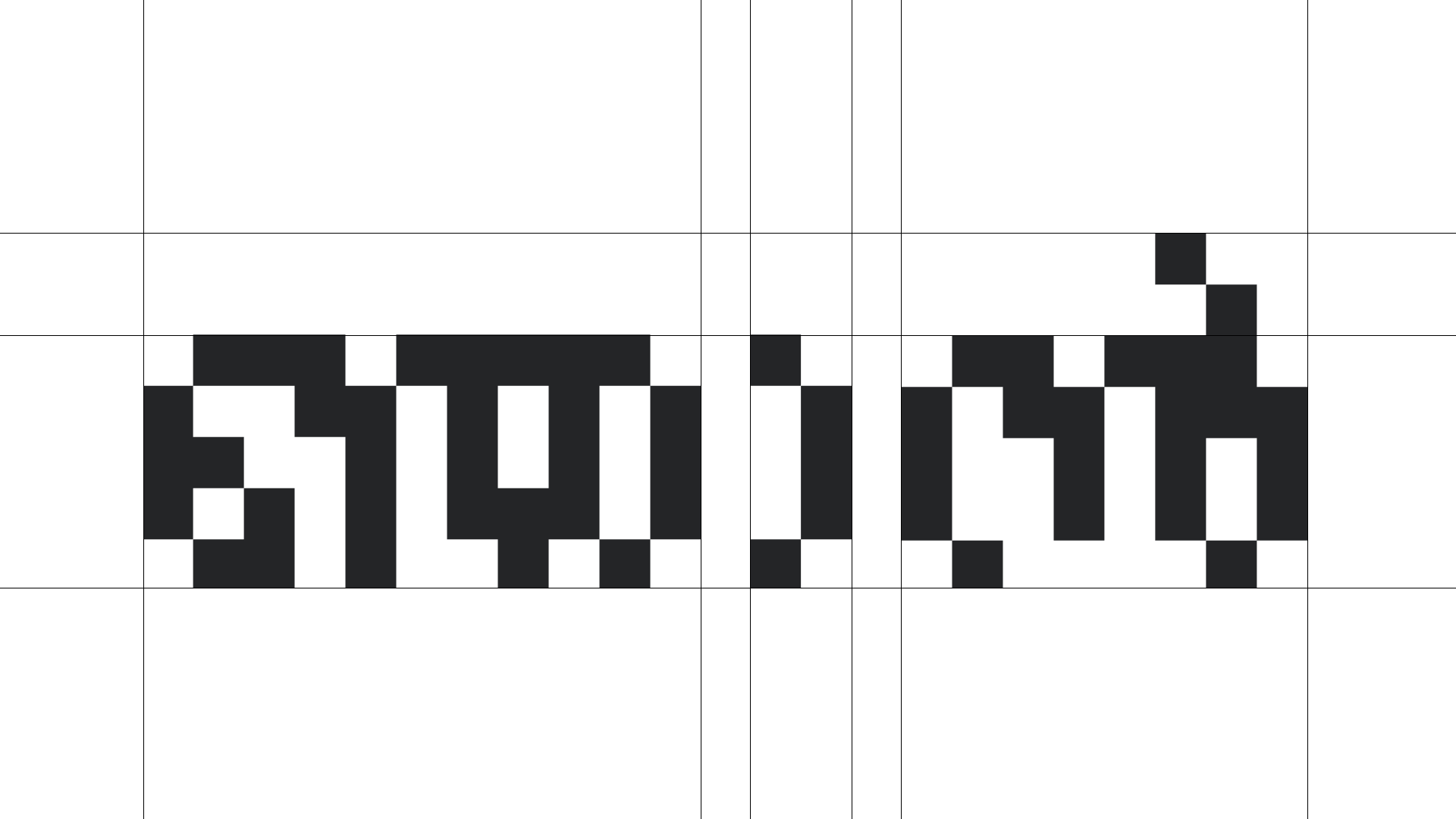
works really well with tiny5
Eventually, after taking a lot of references, I landed on this. Not the best, but I’m satisfied. I drew it in LibreSprite, took a screenshot, and then bit-traced it in Inkscape (LibreSprite doesn’t do SVGs).
Design
This took foreverrrr. Cause this is me we’re talking about. In a way, I had to find myself (i don’t think i did, but ig i found something). The colors, typography, look & feel, everything visual about the site had to tell a story about me. Maybe different interpretations of who I am. I know that design can communicate these sort of things to the viewer, but im not quite there yet. Still figuring out.
I don’t even know how many days I went without using any socials. Totally locked in. Drawing sketches, making mockups in Figma. I think the worst part of designing is that once you lock onto an idea, it just takes your whole day away. At some point, I had to accept that if I kept chasing perfection, there won’t be no njanmuneer at all.
So Yin-Yang, wabi-sabi happened to be what I was exploring at the time. I believe it resonates with my style.
Yin–Yang is a concept from Chinese philosophy, especially Taoism, which explains reality as a balance of opposing but complementary forces. Yin and Yang are not enemies; they depend on each other and constantly transform into one another. Darkness gives meaning to light, rest gives meaning to action, and neither can exist in isolation. The idea emphasizes that balance is dynamic, not static, and that change is a natural and necessary part of life.
Wabi-sabi is a Japanese aesthetic philosophy rooted in Zen Buddhism that finds beauty in imperfection, impermanence, and incompleteness. Instead of valuing symmetry, polish, and permanence, wabi-sabi appreciates weathered surfaces, asymmetry, and signs of age or human touch. It accepts that nothing lasts, nothing is finished, and nothing is perfect, and sees these qualities not as flaws but as sources of depth and authenticity.
The connection between Yin–Yang and wabi-sabi lies in their shared acceptance of contrast, change, and imperfection as fundamental aspects of reality. Yin–Yang shows that opposites coexist and give meaning to each other, while wabi-sabi shows that beauty emerges through irregularity and decay. Both philosophies reject the pursuit of absolute perfection and control, encouraging instead a mindset of balance, humility, and acceptance of the natural flow of time..
That’s why the style sometimes looks a bit weird.
Most of the web design was done in Figma and partially in Penpot. Although I wanted to use open-source tools for every aspect of the project, I had to make some compromises. I’m just too used to Figma, and Obsidian has its perks.
Still, in the spirit of open source, I’ve made the design file public.
And i think it’s a bit hypocritical of me to criticize others for making everything minimal when my own site is pretty much black and white. But everything is a work in progress. What you’re seeing is version 1 (hopefully). I still have a lot of ideas for this website. So come back after a month or two, if nothing’s changed, hit me up. I’ll probably have a better reason by then.
Like I mentioned earlier, I had to settle on an idea, or I’d still be designing and slowly losing my mind. My mentor once told me, “Everything is a work in progress. Taking small breaks while designing helps you gain a different perspective on how you want to move forward.” Or something like that.
Development, Deployment and Automation
I think most of the development process is fairly straightforward, If you design with development in mind. The rest is mostly following an instruction manual. One could say development is like putting pieces of a puzzle together. while design is about making those pieces (atleast for this website). I think the search and find is what takes us to the final piece.
Now don’t get me wrong. They both have their complexities. Most of what we try to do already exists in some form (this applies to both design and development). Designing took me about two weeks, while development took just a few days. That’s probably because I’ve done more development than design.
I started by writing the HTML files to see how everything looked and felt in the browser and to test responsiveness. Then I went back and adjusted the design. I spend a lot of time understanding how Hugo works, watching videos, reading documentation. AI helped a lot too. Making my own template sounded complicated at first, but I didn’t struggle much, probably because the site itself isn’t very complex. Either way, I had a great time using Hugo.
For those who don’t know: Hugo is a static site generator written in Go. It expects a certain file structure, configuration settings, templates, and user content, which are then published as a website when you run the hugo command in a console. Instead of building the entire site manually, you build reusable pieces, layouts and styles. When you want to write a blog, you just create a Markdown file in /content, run Hugo, and it generates the final files in /public.
I set up a CI/CD pipeline so the heavy lifting happens on a remote server. All I have to do is write and push. GitLab CI/CD handles the rest. And to make things more efficient, I added a few automations:
Scripts
- If you check the repository there’s two scripts there
push.shandjournal.sh push.shchecks whethergit diff -- contentreturns anything. If it does, it shows the changes and asks whether to push. Pressing Enter orYpushes it.journal.shtakes a string argument and pushes it directly to GitLab.- I made
fishthe default shell in Termux and editedconfig.fishto add~/bintoPATH. I copied both scripts into~/bin. I avoided touchingbashrctoo much because Bash and Termux have a complicated relationship, and I didn’t want to break anything.
Here’s a snippet from my bashrc:

And a snippet from my config.fish:
Obsidian Templates
Each Markdown file needs a few lines of TOML front matter to function properly, like this:
Normally, Hugo generates this using archetypes when you run:
But on a phone, that’s a bit inefficient. So I created templates in Obsidian for blogs and journals instead. You can find those in the Templates directory.
Current Workflow (WIP)
for blogs its looks like this:
i make a new note on obsidian and apply the template
go to termux and type push and enter
I write the blogs in obsidian and keep them in
/content/all-blogsStage, commit and push
GitLab CI runs
hugo --minifyand uploads thepublicfolder to Neocities using the Neocities API and CLIDuring testing, it deploys to GitLab Pages
I probably missed a few things here, and honestly, I don’t remember them all. If you have any questions about this, feel free to reach out.



